


Python 推送消息到企业微信
企业微信提供了完善的 API 接口,支持通过 Python 快速实现消息推送。
一、准备工作
注:使用企业微信首先需要注册企业,个人也可以注册。
1.1 企业微信基础配置
首先需要获取企业微信的核心配置信息,分为「应用推送」和「群机器人推送」两种场景(本教程重点讲应用推送,群机器人作为补充)。
场景 1:企业微信应用推送(推荐,支持多类型消息)
步骤 1:登录企业微信管理后台
地址:https://work.weixin.qq.com/wework_admin/frame#/apps
步骤 2:创建 / 选择应用
进入「应用管理」→「自建应用」→「创建应用」(或选择已有的自建应用),记录以下信息:
corpid:企业 ID(在「我的企业」→「企业信息」中查看)corpsecret:应用的 Secret(在应用详情页的「应用 Secret」处,点击查看需扫码验证)agentid:应用 ID(应用详情页的「AgentId」)
步骤 3:设置应用可见范围
确保接收消息的用户 / 部门在应用的「可见范围」内,否则推送会失败。

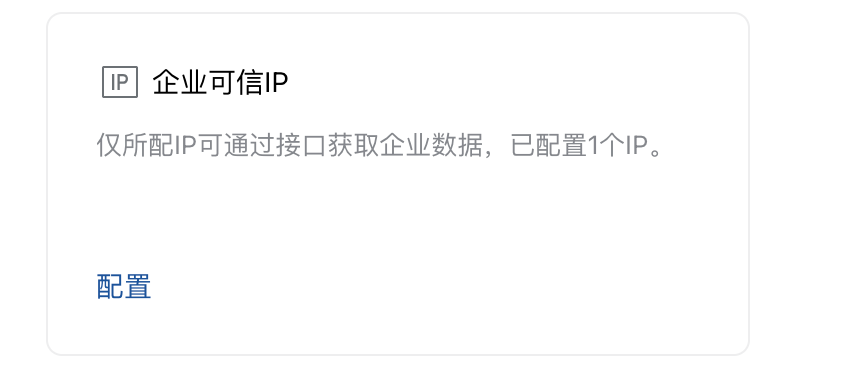
步骤 4:配置企业可信IP
企业微信开启了公网ip限制,只有配置的ip才可以调用企业微信的接口。
场景 2:企业微信群机器人推送(简单,仅支持文本 / Markdown)
进入企业微信群聊→「群设置」→「群机器人」→「添加机器人」,复制机器人的 Webhook 地址(格式:
https://qyapi.weixin.qq.com/cgi-bin/webhook/send?key=xxxx)。
二、核心接口说明
企业微信推送的核心是两个接口:
获取访问令牌(access_token)所有接口调用都需要先获取
access_token,有效期 2 小时,建议缓存避免频繁调用。请求地址:
https://qyapi.weixin.qq.com/cgi-bin/gettoken请求方式:GET
参数:
corpid+corpsecret
发送应用消息获取
access_token后,调用消息发送接口推送消息。请求地址:
https://qyapi.weixin.qq.com/cgi-bin/message/send?access_token=ACCESS_TOKEN请求方式:POST
支持消息类型:文本、图片、Markdown、卡片、文件等(本教程重点讲文本 / Markdown)。
三、代码实现
3.1 基础版:文本消息推送(应用推送)
import requests
import json

# 企业微信配置(替换为你的实际值)
CORPID = "你的企业ID"
CORPSECRET = "你的应用Secret"
AGENTID = 1000008  # 你的应用ID
TO_USER = "@all"  # 接收人:@all表示全员,也可填用户账号(多个用|分隔,如"zhangsan|lisi",示例代码:"|".join(useridlist))

def get_access_token():
    """获取access_token"""
    url = f"https://qyapi.weixin.qq.com/cgi-bin/gettoken?corpid={CORPID}&corpsecret={CORPSECRET}"
    try:
        resp = requests.get(url, timeout=10)
        resp.raise_for_status()  # 抛出HTTP异常
        result = resp.json() # 或者:json.loads(resp.text)
        if result.get("errcode") == 0:
            return result["access_token"]
        else:
            print(f"获取access_token失败:{result}")
            return None
    except Exception as e:
        print(f"请求异常:{e}")
        return None

def send_text_message(content):
    """发送文本消息"""
    access_token = get_access_token()
    if not access_token:
        return

    url = f"https://qyapi.weixin.qq.com/cgi-bin/message/send?access_token={access_token}"
    # 消息体(文本类型)
    data = {
        "touser": TO_USER,
        "msgtype": "text",
        "agentid": AGENTID,
        "text": {
            "content": content
        },
        "safe": 0,  # 0表示普通消息,1表示保密消息
        "enable_id_trans": 0,
        "enable_duplicate_check": 0
    }

    try:
        resp = requests.post(url, json=data, timeout=10)
        resp.raise_for_status()
        result = resp.json()
        if result.get("errcode") == 0:
            print("消息推送成功!")
        else:
            print(f"消息推送失败:{result}")
    except Exception as e:
        print(f"请求异常:{e}")

# 测试推送
if __name__ == "__main__":
    send_text_message("【Python推送测试】这是一条来自Python的企业微信消息✨")
3.2 进阶版:Markdown 消息推送
Markdown 支持更丰富的格式(标题、列表、链接、引用等),适合推送通知 / 告警:
def send_markdown_message(content):
    """发送Markdown消息"""
    access_token = get_access_token()
    if not access_token:
        return

    url = f"https://qyapi.weixin.qq.com/cgi-bin/message/send?access_token={access_token}"
    data = {
        "touser": TO_USER,
        "msgtype": "markdown",
        "agentid": AGENTID,
        "markdown": {
            "content": content
        },
        "safe": 0
    }

    try:
        resp = requests.post(url, json=data, timeout=10)
        resp.raise_for_status()
        result = resp.json()
        if result.get("errcode") == 0:
            print("Markdown消息推送成功!")
        else:
            print(f"Markdown消息推送失败:{result}")
    except Exception as e:
        print(f"请求异常:{e}")

# 测试Markdown推送
if __name__ == "__main__":
    markdown_content = """
### 系统告警通知
> 时间:2025-12-08 10:00:00
> 级别:⚠️ 警告
> 内容:服务器CPU使用率达到90%
> 链接:[查看详情](https://monitor.example.com)

**处理建议:**
1. 检查异常进程
2. 扩容服务器配置
3. 联系运维团队(138xxxx8888)
    """
    send_markdown_message(markdown_content)
3.3 简易版:群机器人推送
如果仅需简单推送,无需企业 ID/Secret,直接用群机器人 Webhook:
def send_robot_message(webhook_url, content, msg_type="text"):
    """企业微信群机器人推送"""
    url = webhook_url
    if msg_type == "text":
        data = {
            "msgtype": "text",
            "text": {
                "content": content
            }
        }
    elif msg_type == "markdown":
        data = {
            "msgtype": "markdown",
            "markdown": {
                "content": content
            }
        }
    else:
        print("暂不支持该消息类型")
        return

    try:
        resp = requests.post(url, json=data, timeout=10)
        resp.raise_for_status()
        result = resp.json()
        if result.get("errcode") == 0:
            print("群机器人消息推送成功!")
        else:
            print(f"群机器人消息推送失败:{result}")
    except Exception as e:
        print(f"请求异常:{e}")

# 测试群机器人
if __name__ == "__main__":
    WEBHOOK_URL = "你的群机器人Webhook地址"
    send_robot_message(WEBHOOK_URL, "【群机器人测试】这是一条测试消息")
3.4 优化版:缓存 access_token(避免频繁调用)
access_token有效期 2 小时,重复调用获取接口会导致旧 token 失效,建议缓存:
import time

# 全局变量缓存access_token
token_cache = {
    "access_token": None,
    "expire_time": 0  # 过期时间戳
}

def get_access_token_cached():
    """带缓存的access_token获取"""
    current_time = time.time()
    # 缓存有效则直接返回
    if token_cache["access_token"] and current_time < token_cache["expire_time"]:
        return token_cache["access_token"]

    # 缓存失效,重新获取
    url = f"https://qyapi.weixin.qq.com/cgi-bin/gettoken?corpid={CORPID}&corpsecret={CORPSECRET}"
    try:
        resp = requests.get(url, timeout=10)
        resp.raise_for_status()
        result = resp.json()
        if result.get("errcode") == 0:
            token_cache["access_token"] = result["access_token"]
            # 有效期7200秒,提前100秒过期,避免临界问题
            token_cache["expire_time"] = current_time + 7100
            return token_cache["access_token"]
        else:
            print(f"获取access_token失败:{result}")
            return None
    except Exception as e:
        print(f"请求异常:{e}")
        return None
四、常见问题排查
4.1 推送失败常见错误码
4.2 其他注意事项
IP 白名单:如果企业微信设置了「应用可信 IP」,需将 Python 运行机器的 IP 加入白名单(应用详情页→「可信 IP」)。
频率限制:企业微信接口有调用频率限制(默认应用消息每分钟最多 200 次),避免高频推送。
消息长度限制:文本消息最多 2048 个字符,Markdown 最多 4096 个字符,超长需分段。
接收人格式:
推送给所有人:
touser: "@all"推送给指定用户:
touser: "zhangsan|lisi"(用户账号,不是手机号 / 昵称)推送给部门:
toparty: "1|2"(部门 ID,在「组织架构」中查看)
五、扩展场景
推送图片 / 文件:需先调用「上传临时素材」接口获取 media_id,再在消息体中使用。
定时推送:结合
schedule库实现定时消息(pip install schedule)。集成到监控系统:将推送函数嵌入 Prometheus/Grafana 告警、日志监控等场景。
多应用管理:封装成类,支持多 corpid/agentid 切换。
六、完整封装类(推荐生产环境使用)
import requests
import time
import json
from typing import Optional, Dict

class WeChatWorkSender:
    """企业微信消息推送类"""
    def __init__(self, corpid: str, corpsecret: str, agentid: int):
        self.corpid = corpid
        self.corpsecret = corpsecret
        self.agentid = agentid
        self.token_cache: Dict[str, Optional[float]] = {
            "access_token": None,
            "expire_time": 0.0
        }

    def _get_access_token(self) -> Optional[str]:
        """获取access_token(带缓存)"""
        current_time = time.time()
        if self.token_cache["access_token"] and current_time < self.token_cache["expire_time"]:
            return self.token_cache["access_token"]

        url = f"https://qyapi.weixin.qq.com/cgi-bin/gettoken?corpid={self.corpid}&corpsecret={self.corpsecret}"
        try:
            resp = requests.get(url, timeout=10)
            resp.raise_for_status()
            result = resp.json()
            if result.get("errcode") == 0:
                self.token_cache["access_token"] = result["access_token"]
                self.token_cache["expire_time"] = current_time + 7100
                return self.token_cache["access_token"]
            else:
                print(f"获取access_token失败:{result}")
                return None
        except Exception as e:
            print(f"请求异常:{e}")
            return None

    def send_message(self, content: str, touser: str = "@all", msg_type: str = "text") -> bool:
        """
        发送消息
        :param content: 消息内容
        :param touser: 接收人,@all表示全员
        :param msg_type: 消息类型,text/markdown
        :return: 是否发送成功
        """
        access_token = self._get_access_token()
        if not access_token:
            return False

        url = f"https://qyapi.weixin.qq.com/cgi-bin/message/send?access_token={access_token}"
        data = {
            "touser": touser,
            "agentid": self.agentid,
            "safe": 0,
            "enable_id_trans": 0,
            "enable_duplicate_check": 0
        }

        if msg_type == "text":
            data["msgtype"] = "text"
            data["text"] = {"content": content}
        elif msg_type == "markdown":
            data["msgtype"] = "markdown"
            data["markdown"] = {"content": content}
        else:
            print(f"不支持的消息类型:{msg_type}")
            return False

        try:
            resp = requests.post(url, json=data, timeout=10)
            resp.raise_for_status()
            result = resp.json()
            if result.get("errcode") == 0:
                print("消息发送成功")
                return True
            else:
                print(f"消息发送失败:{result}")
                return False
        except Exception as e:
            print(f"请求异常:{e}")
            return False

# 使用示例
if __name__ == "__main__":
    # 初始化推送器
    sender = WeChatWorkSender(
        corpid="你的企业ID",
        corpsecret="你的应用Secret",
        agentid=你的应用ID
    )
    # 发送文本消息
    sender.send_message("【生产环境】系统正常运行中✅")
    # 发送Markdown消息
    sender.send_message(
        content="### 每日报表\n> 今日订单量:1200单\n> 转化率:25%",
        msg_type="markdown"
    )
总结
本教程覆盖了企业微信消息推送的核心流程:从配置获取、接口调用、代码实现到问题排查。核心要点:
优先使用应用推送(功能丰富),简单场景用群机器人;
缓存
access_token避免频繁调用;重点检查「可见范围」「IP 白名单」「配置参数正确性」;
生产环境建议封装成类,便于维护和扩展。
如果需要推送图片、文件、卡片等其他类型消息,可以参考企业微信官方 API 文档:https://developer.work.weixin.qq.com/document/path/9023
评论